How to Download Vimeo Videos in 2026
Vimeo is where a lot of video lives that never touches YouTube: agency reels, wedding films, indie shorts, paid courses, Staff Picks. If you want to keep a copy of one — for offline viewing, for a portfolio archive, for a client who needs the file — the first thing you'll usually hit is that Vimeo's own download button is nowhere to be found.
This guide covers why that happens, how to actually get a copy when it does not, and what to check first so you are not fighting a video that was never going to be downloadable.
Why Vimeo's Download Button Is Usually Missing
Unlike YouTube, Vimeo gives every uploader a per-video toggle for whether viewers can download the original file. It lives in the video's Privacy or Distribution settings, and it is off by default. Most uploaders never turn it on — agencies protecting client work, filmmakers who only want the video watched (not copied), course creators who sell the download separately.
That means on the majority of Vimeo videos you will find in the wild, there is no built-in download link at all, regardless of your account tier. This is a deliberate choice by the platform, not a bug or a paywall.
Get Just the Audio
Switch the KlipTools Video Downloader's format to Audio Only to pull an MP3, WAV, or FLAC straight out of a Vimeo video — useful for talks, interviews, and music videos.
Try Video Downloader →Downloading a Vimeo Video
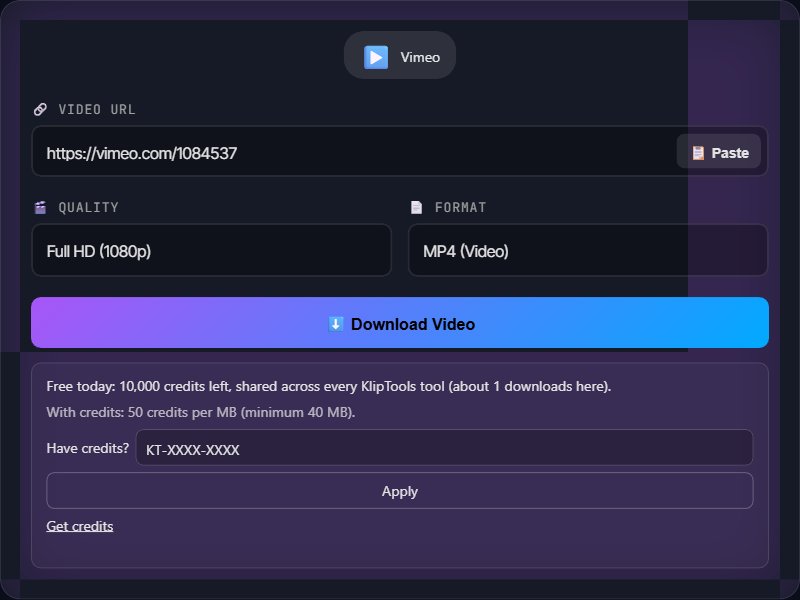
Step 1: Open the video on vimeo.com and copy the URL from your browser's address bar. It looks like https://vimeo.com/123456789. If you got the link from Vimeo's Share panel, that link works the same way.
Step 2: Open a video downloading tool in your browser and paste the Vimeo URL into the input field.
Step 3: Pick your resolution and output format. If the uploader made multiple resolutions available for streaming, you can usually choose among them; if not, you get whatever the original stream quality was.
Step 4: Click download. The file saves to your device — as MP4 by default, or as an audio file if you switched formats.
Finding a Vimeo Link Inside an Embed
A lot of Vimeo video never gets opened on vimeo.com at all — it is embedded directly on a company's site, a course platform, or a blog post. You still need the actual vimeo.com URL to download it, and there are two quick ways to find it:
Right-click the player. Right-clicking an embedded Vimeo player often shows a context menu with a link back to the video on vimeo.com. Not every embed exposes this, but it is the fastest route when it works.
Check the page source or embed code. Search the page for "vimeo.com" — the iframe's src attribute will contain a URL like player.vimeo.com/video/123456789. Replace player.vimeo.com/video/ with vimeo.com/ and you have a working link.
One catch: some uploaders restrict an embed to specific domains, meaning the video only plays when embedded on their approved site and refuses to play on vimeo.com directly for anyone else. In that case, no downloading tool can retrieve it — the restriction is enforced by Vimeo's servers, not by the embed.
Quality Varies More on Vimeo Than Elsewhere
YouTube encodes every upload into a predictable ladder of resolutions. Vimeo does not work quite the same way — what quality is available depends heavily on the uploader's account tier and what they chose to upload.
Free and Plus accounts have upload bitrate and resolution caps, so the source file itself may be modest even at "1080p."
Pro and Business accounts can upload much higher-bitrate masters, including 4K, which is why Vimeo is popular with agencies and filmmakers who care about archival quality — the platform can actually hold onto a near-source-quality copy, unlike most social platforms that compress everything down hard.
Whatever streaming quality the uploader made available is what you get in the download. There is no way to recover detail that was never in the encode.
Password-Protected and Private Videos
Vimeo lets uploaders lock a video behind a password, or restrict it to Vimeo members only, or make it fully private (visible only to people the uploader adds directly). If you have legitimate access — you know the password, or you are logged into the account it was shared with — and the video plays for you in the browser, most downloading tools can still fetch it from that same URL. If you do not have access, no tool can bypass the restriction; that is the platform's access control working as intended, not a limitation of the downloader.
What About Vimeo Staff Picks and Showcases?
Staff Picks are just regular Vimeo videos that Vimeo's editorial team has featured — the download rules are identical to any other video: it depends entirely on whether the uploader enabled downloads for that specific video. A Showcase (a curated collection page) is just a grouping; you still need the individual video URL for each one inside it.
Ethical and Practical Notes
Vimeo hosts a lot of paid and client work. More than most platforms, a Vimeo video you find is often someone's livelihood — a wedding videographer's delivery, an agency's client reel, a course module someone paid for. Downloading a personal archival copy of something you were given legitimate access to is different from redistributing someone else's paid content.
Respect the download toggle. If an uploader deliberately left downloads off, that is a signal, not an oversight to route around for anything beyond personal viewing.
Commercial use needs permission. If you want to use a Vimeo video — even a small clip of it — in your own published work, reach out to the creator first.
Frequently Asked Questions
Why does Vimeo's own download button not show up?
Can I download a password-protected Vimeo video?
Can I download a Vimeo video that is only embedded on someone's website, not on vimeo.com?
What quality does a downloaded Vimeo video come in?
Is downloading a Vimeo video legal?
Wrapping Up
Downloading from Vimeo comes down to one question first — did the uploader allow it — and only then to the mechanics of copying the link and running it through a tool. Check for the embed link if you started on someone's website, watch for password and domain restrictions, and remember that Vimeo skews toward professional and paid content more than most platforms, so a little more caution about reuse is warranted. For more downloading guides, check out our articles on YouTube, Twitch, and Dailymotion.
What to Do with the Clip
The Subtitle Generator turns it into a timed SRT or VTT in 90+ languages, the Video Trimmer cuts it down to the part worth keeping with no re-encode, and the Video Compressor shrinks it when a platform refuses the upload size.