How to Download SoundCloud Tracks in 2026
SoundCloud is where a massive amount of music lives that is not on Spotify or Apple Music at all — DJ sets, remixes, unsigned artists, SoundCloud rap, podcast episodes, demos. Unlike video platforms, what you want here is audio only, and SoundCloud's own download button is hit-or-miss: some artists enable it, most do not.
This guide covers getting a track saved as an MP3 either way, and what to expect from quality and access along the way.
Why SoundCloud's Download Button Is Inconsistent
SoundCloud lets every uploader choose, per track, whether to offer a free download of the original file — it is off by default. Independent artists and DJs are split on this: some want easy downloads for promotion, but many leave it off, especially on tracks built from samples, remixes, or unreleased material where an easily downloadable master is harder to control once it is circulating.
That inconsistency is normal on SoundCloud specifically, more so than on most platforms. Whether the button is there tells you nothing about whether the track itself is downloadable through other means — it only reflects that specific artist's choice for that specific track.
One Tool, Any Audio Format
The KlipTools Video Downloader switches to Audio Only mode and exports MP3, M4A, WAV, FLAC, OGG, or OPUS at up to 320 kbps — not just from SoundCloud, from any supported platform.
Try Video Downloader →Downloading a SoundCloud Track
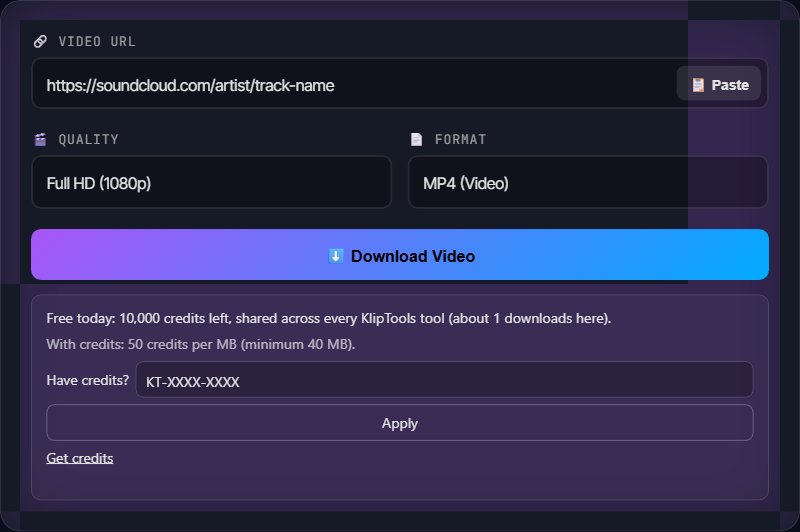
Step 1: Open the track on soundcloud.com and copy the URL from your browser's address bar, or tap Share and copy the link it gives you. It looks like https://soundcloud.com/artist/track-name.
Step 2: Open a video downloading tool in your browser and paste the SoundCloud URL into the input field.
Step 3: Switch the format to Audio Only, since SoundCloud content is audio, not video. Pick your preferred format — MP3 is the safest default for compatibility — and a bitrate like 320 kbps.
Step 4: Click download. The MP3 (or your chosen format) saves to your device.
What Quality to Expect
A downloading tool captures whatever SoundCloud actually streams, nothing more. Free-tier uploaders stream at a lower bitrate by default; artists on SoundCloud Pro or Pro Unlimited can serve higher-quality streams, and some plans support lossless audio. If a track sounds compressed or thin, that is usually the source encode, not a limitation of the download.
Private and Unlisted Tracks
SoundCloud lets artists set a track to "private" while still sharing it via a direct link (common for demos and works-in-progress sent to a small audience), or restrict it entirely to approved followers. If you have a private-with-link URL and it plays in your browser, a downloading tool can typically fetch it the same way. A track restricted to specific followers only, without a public link, cannot be accessed by any tool if you are not one of them.
Downloading a Playlist or Album
SoundCloud playlists (including full albums uploaded as a playlist) are made of individual tracks, each with its own URL. Most browser-based downloading tools work one track at a time, so open each track inside the playlist and copy its individual link rather than the playlist URL itself.
Ethical Notes
A lot of SoundCloud is unsigned and independent. Downloading for personal listening supports discovery the same way streaming does. Reuploading someone's track elsewhere, or using it in your own content without permission, does not.
Sample and remix culture is huge here, and licensing is often unclear. A remix or a track built on an uncleared sample can carry real legal risk if you redistribute it, independent of whether the original uploader intended it for downloading.
If you like a track, support the artist — follow them, buy the track if it is for sale elsewhere, or share the SoundCloud link itself rather than a downloaded copy.
Frequently Asked Questions
Why do some SoundCloud tracks have a download button and others do not?
What audio quality do I get from a SoundCloud download?
Can I download a private or unlisted SoundCloud track?
Can I download a whole SoundCloud playlist or album at once?
Is downloading a SoundCloud track legal?
Wrapping Up
SoundCloud is the odd one out in this series because it is audio-first — the workflow is identical, just remember to switch the downloader to Audio Only. Whether the built-in download button is there or not tells you nothing about whether the track is downloadable, so check the URL first regardless. For more downloading guides, check out our articles on YouTube, Vimeo, and Twitch.
What to Do with the Track
The Video Downloader's Audio Only mode also outputs WAV and FLAC for lossless archiving, and once you have the MP3, most audio editors can trim, fade, or loop it for a mix, intro, or sample.